


Habit Tracker With App Blocking (iPhone, 2026)

 X
X LinkedIn
The App Store has dozens of habit trackers. It has dozens of app blockers, too. The category in between, where a tracker enforces what it tracks by blocking the apps that distract you from doing it, is almost empty. That gap is one of the more consequential UX gaps in digital wellness right now, and it is why many people uninstall both kinds of app within a month.
This post defines the missing category, explains why it stayed missing for so long, and reviews the small set of iPhone apps that combine habit tracking with real iOS-level app blocking.
The structural gap
Habit trackers descend from analog journals. The model is Benjamin Franklin's thirteen-virtues self-evaluation chart, reproduced in app form. The user reflects, checks a box, builds awareness over time. Streaks, Way of Life, and Habitica all sit in this lineage. The app is a mirror.
App blockers descend from parental control software. The model is enterprise device management adapted for personal use. The user sets a rule, the device enforces it. Opal, Freedom, and Apple Screen Time sit in this lineage. The app is a fence.
The two product cultures evolved separately. Tracker developers come from the journaling and quantified-self community. Blocker developers come from the security and parental control community. The user is the same person. The tools were built for different mental models of the same problem.
So the person who wants to read more but cannot stop scrolling Instagram ends up needing two apps. A habit tracker to log the reading. An app blocker to disable Instagram. The two never talk to each other. The blocker does not know the reading got done. The tracker does not know Instagram got opened anyway. You juggle both, get tired of the context-switch, and uninstall.
Why combining the two is hard
Building a habit tracker is straightforward iOS development. Local notifications, SwiftData persistence, HealthKit reads, basic widgets. A solo developer can ship a credible tracker in three months.
Building an app blocker is harder. Apple opened the Screen Time API in 2021 with FamilyControls and ManagedSettings, but the framework has steep prerequisites. The developer needs the FamilyControls entitlement (Apple-approved per app), must implement a Shield UI extension for the locked-app screen, must store shielded apps in an App Group container readable by the extension, and must navigate the permission flow that requires the user to grant FamilyControls access at install time.
Most tracker developers do not have the appetite to add a second engineering project of that complexity to a working app. Most blocker developers do not have the design instinct to add a habit tracker that does not feel like a feature graveyard. The two categories stayed separate because the integration is hard, not because users wanted it that way.
For the technical detail on the Screen Time API and what is and is not possible, see the Apple Screen Time API guide.
The combined-category attempts in 2026
A handful of apps attempt the combination. Most settle for a soft version. One does it at the iOS level.
| App | Tracking | Blocking | Block enforcement | AI photo verification (Anti-Cheat) | Trade-off |
|---|---|---|---|---|---|
| Habit Doom | Full | Full | iOS ManagedSettings | Yes (free) | Newer, smaller habit template library than Streaks |
| Forest | Focus sessions | Soft (tree dies) | Virtual only | No | Not a habit tracker in the daily-check sense |
| Habitica | Full | Soft (character HP) | Virtual only | No | Gamification not for everyone |
| Brick | Pairs with notes | NFC tag required | Physical | No | Requires hardware purchase |
| Routinery | Sequenced routines | None | None | No | Routine layer is rigid |
Only one of the five (Habit Doom) enforces blocking at the iOS system level. The others use virtual, social, or physical penalties. That distinction matters, because virtual penalties stop working the moment you get desensitized to them. The first dead Forest tree is sad. The fiftieth is background noise.
Why the combined model retains better
Habit tracking apps have a retention problem that is well documented. Wendy Wood's research at USC shows that habit formation requires repetition under stable conditions. Most habit trackers do not engineer the stability. They log the outcome.
Combined apps engineer the stability by making the user's existing behavior expensive. Skipping the habit does not just break the streak. Skipping the habit means Instagram stays locked. The cost is immediate, system-level, and unambiguous.
This shift matches B.J. Fogg's behavior model. Fogg, who runs Stanford's Behavior Design Lab, argues that behavior happens when motivation, ability, and prompt converge. Pure habit trackers handle prompt (the reminder) and partial motivation (the streak). They leave ability untouched. Combined apps handle ability by removing the easier alternative.
The retention difference shows up in the real world. Pure habit trackers tend to have weak month-one retention. Apps with a forcing function (Forest, Habitica, Habit Doom) tend to retain better because the forcing function is doing the work that motivation alone cannot.
Detailed reviews of the combined apps
1. Habit Doom: Tracker plus iOS-level blocker
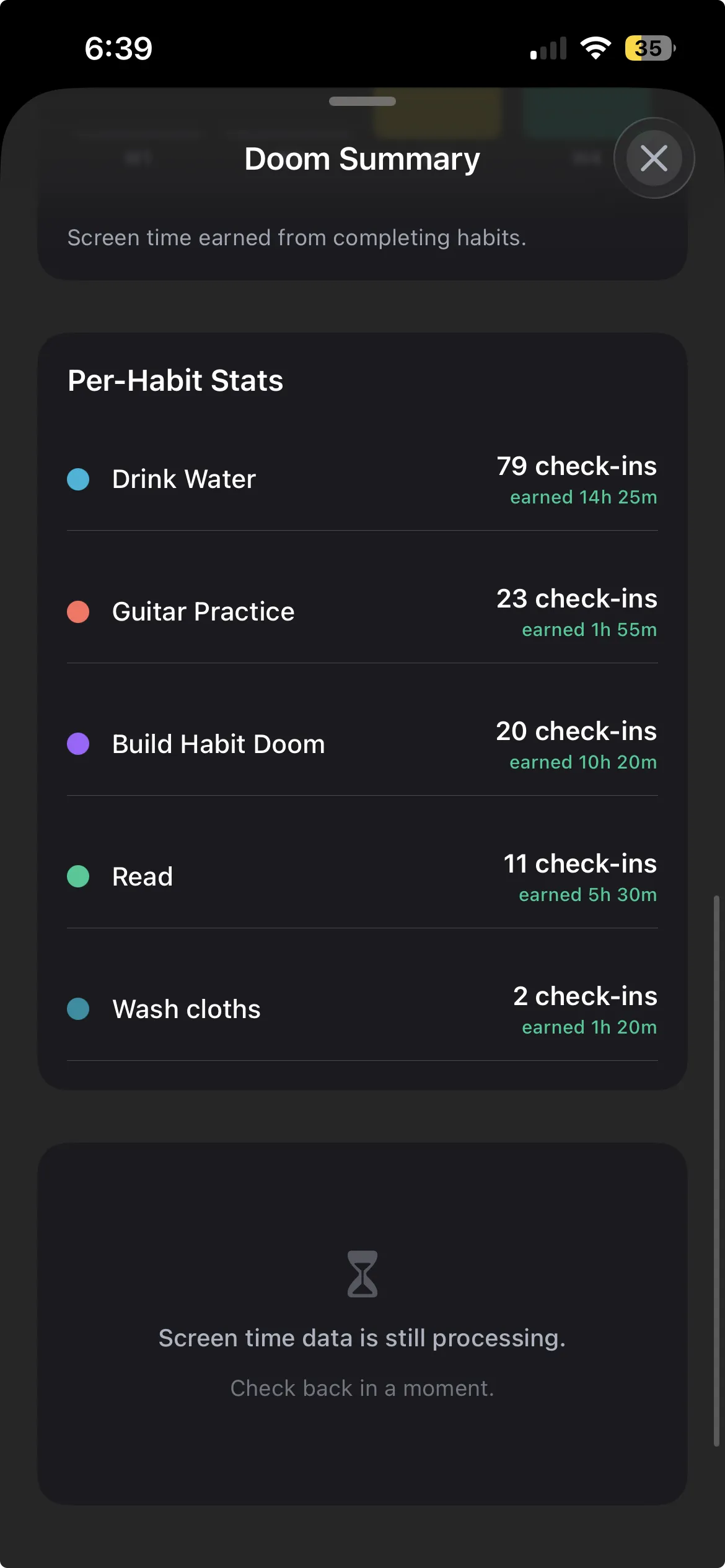
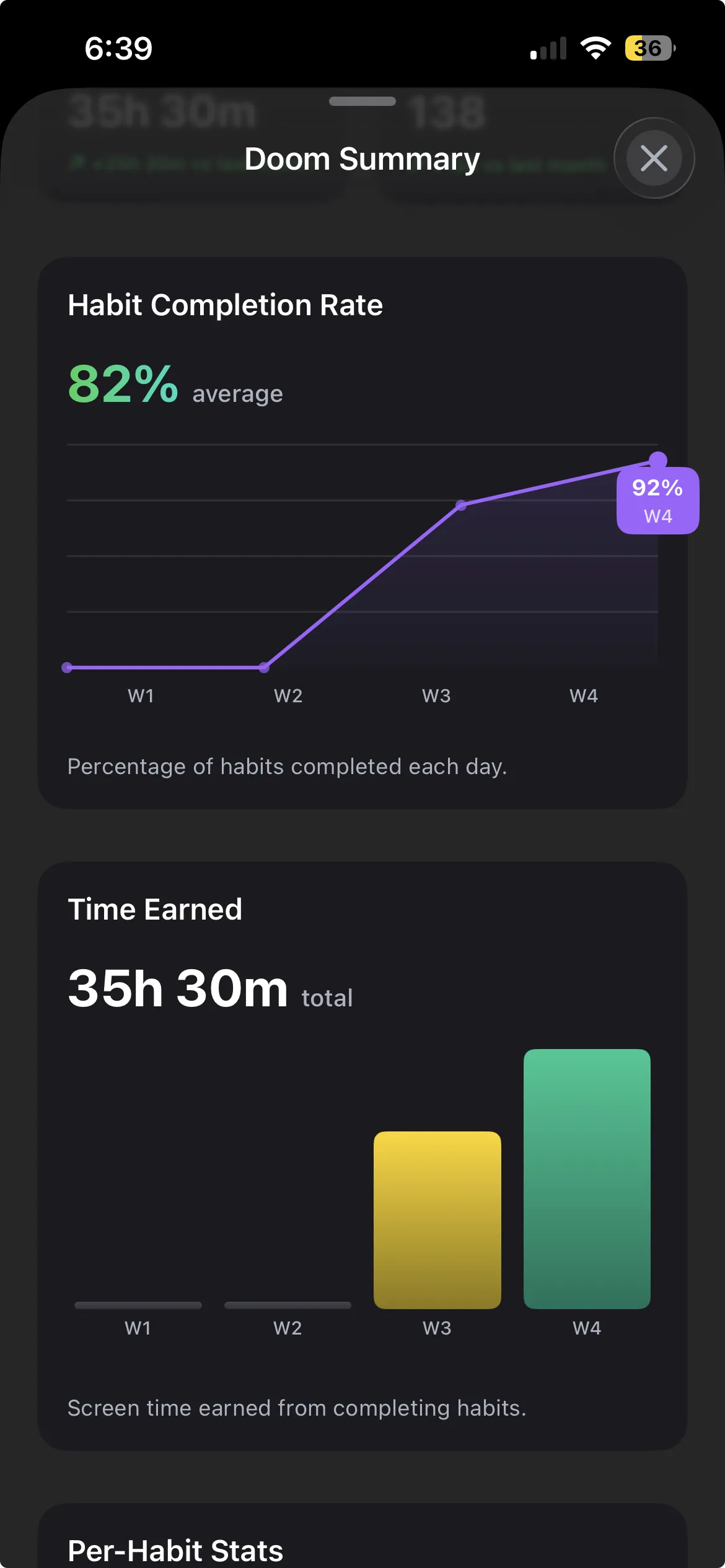
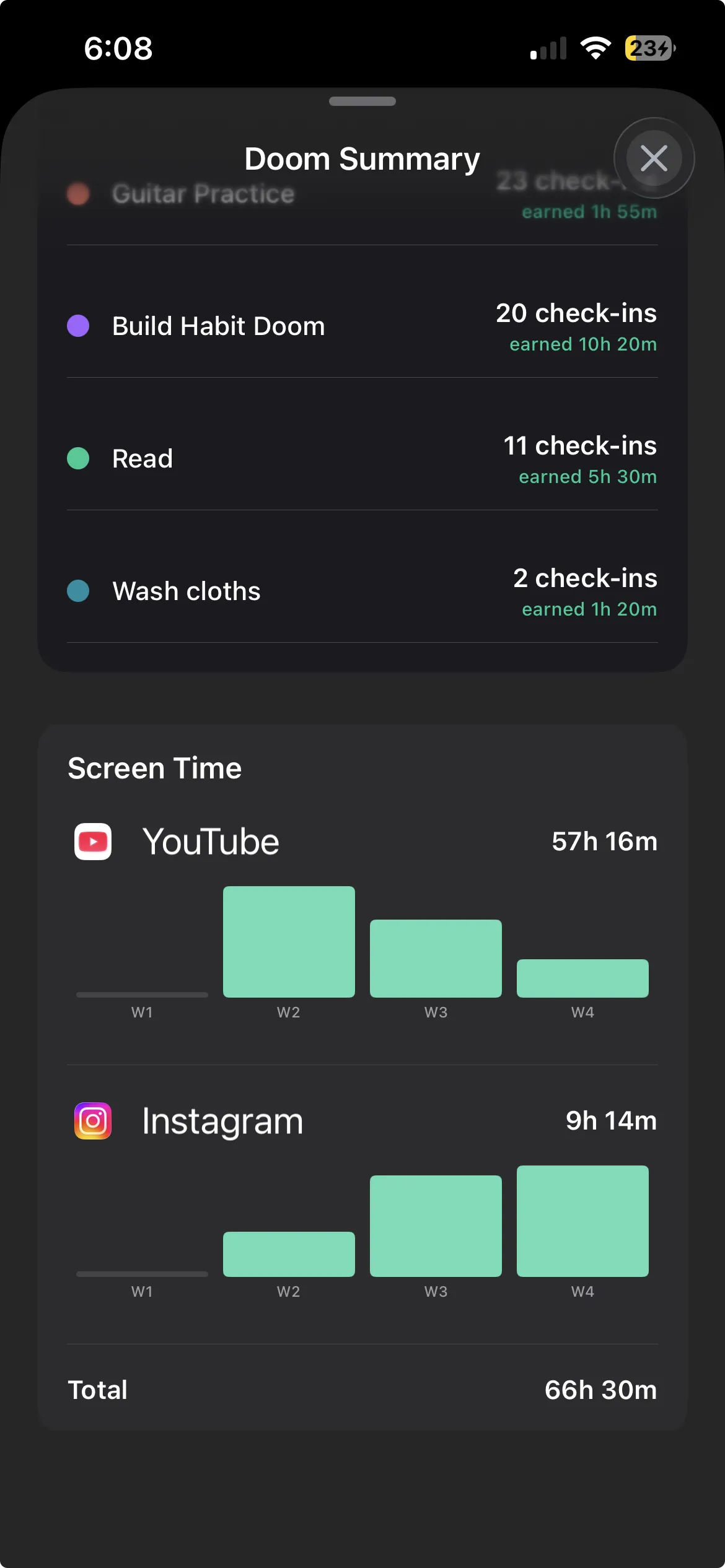
Habit Doom is built as one app with two integrated layers. The tracking layer covers daily habits, streaks, custom schedules, HealthKit integration, and widgets. The blocking layer covers selected iOS apps (Instagram, TikTok, YouTube, X, anything the user chooses) and enforces the block via ManagedSettings.
The two layers are connected. Habits and blocked apps share state. When the habits are checked off, the blocked apps unlock. When the habits reset at the start of the next day, the apps lock again. The user does not have to coordinate between two apps. The system does it. An optional free feature called Anti-Cheat makes that shared state honest: when a habit is checked off, the camera opens and an on-device AI model verifies a real-time photo matches the habit (usually in under half a second, with photos never leaving the device), so the unlock depends on verified completion rather than a tap. The habit tracker you cannot cheat post covers it in full.
The honest limits are real. Habit Doom is newer than Streaks and has fewer pre-built habit templates. Users who want extensive analytics or RPG mechanics will find Habit Doom plain. Users who want their tracking and blocking to talk to each other find Habit Doom the only iPhone option that does it at the system level.
- Combined depth: Tracking and blocking share state. Habit completion triggers unlock.
- Block enforcement: iOS ManagedSettings API.
- Price: Free with full base features. Premium $4.99/month, $19.99/year (with a 7-day free trial), or $29.99 lifetime.
2. Forest: Focus timer plus virtual penalty
Forest is closer to a focus app than a habit tracker, but the daily streak of completed sessions functions as light habit tracking. The user starts a timer, stays off the phone, and a virtual tree grows. Open another app, and the tree dies.
Forest combines a tracking concept (sessions completed) with a soft blocking concept (the virtual tree). The penalty is reputational. For users who already work in Pomodoro blocks, Forest is a good fit. For users who want a real daily habit tracker, Forest is missing the daily-check pattern.
- Combined depth: Focus session tracking with virtual penalty.
- Block enforcement: None. The tree is virtual.
- Price: Free, with an optional Plus subscription from about $5.99/month.
3. Habitica: Tracker plus RPG penalty
Habitica is a full habit tracker layered with RPG mechanics. Habits, dailies, and to-dos all feed into a character that levels up. Skipped habits cause HP damage. Completed habits earn experience and gold for armor and pets.
Habitica's penalty is the closest virtual analog to a real block. The RPG damage is severe enough that engaged users feel the cost. The catch is that Habitica does not block any iOS app. The character takes damage. The user can still open Instagram. For users who respond to gamification, Habitica is the strongest pick. For users who need the phone to actually become boring, Habitica is incomplete.
- Combined depth: Tracking plus RPG penalty.
- Block enforcement: None. RPG damage only.
- Price: Free with $4.99/month premium.
4. Brick: Tracker plus physical NFC block
Brick is a small NFC-tagged physical device that pairs with an iPhone app to enforce blocks. The user blocks selected apps in the app and unlocks them by tapping the phone against the Brick. The physical step is the friction. To unlock, the user has to physically walk to where the Brick is stored.
Brick's tracking layer is limited. It functions more as a block-on or block-off toggle than a habit tracker. For users who want a physical commitment device, Brick is the most innovative pick in the category. For users who want a software-only habit tracker plus blocker, Brick is over-built.
- Combined depth: Block plus physical commitment.
- Block enforcement: iOS Configuration Profile plus NFC tag.
- Price: ~$59 for the hardware.
5. Routinery: Routine plus no block
Routinery combines sequenced routine completion with timed steps but does not include any blocking layer. The user defines a routine (morning, evening, focus), and Routinery walks through each step with timers and prompts.
The tracking is structured around routines, not individual habits. The blocking is absent. For users who want a coached routine experience, Routinery fits. For users who want their habits to enforce app locks, Routinery does not address the blocking side at all.
- Combined depth: Routine sequencing without blocking.
- Block enforcement: None.
- Price: Free with premium from about $5.49/month or $36/year.
Decision matrix
The combined category in 2026 has one app that fully delivers (Habit Doom) and four that partially deliver. The decision depends on what the user values.
- The user wants the system to enforce what the user tracks. Habit Doom is the only iOS-level fit.
- The user wants gamification. Habitica.
- The user wants physical commitment. Brick.
- The user wants focus sessions, not daily habits. Forest.
- The user wants a coached routine. Routinery.
For most people, the problem is simple: habit trackers stop working by week three because the phone is more compelling than the checklist. The answer is the app that solves the phone first. The habit list is the goal. The blocked phone is the road. Most apps in this category hand you a map and call it transportation. The combined category actually pulls you toward the goal instead of asking you to choose, every day, between the goal and the scroll.
The hardest part of habit formation is not picking the habit. It is removing the easier alternative. The combined-category app does exactly that. For users ready to stop running both kinds of app and start running the one that connects them, see the how Habit Doom works breakdown and the full iPhone blocker comparison for context.
Frequently Asked Questions
Keep Reading
Try Habit Doom
Lock your distracting apps. Complete your habits. Earn your screen time. It takes 30 seconds to set up.
Download Free