


21 Bugs That Nearly Killed My App

 X
X LinkedIn
I want to tell you about January 24, 2026.
That was the day I wrote "Fixed all issues with Automatic App Locking" in my code log. Two saves later, same day: "Fixed auto app blocking." It was not fixed. Not even close. I would write the word "Fixed" nine more times over the next six days before the thing actually worked.
This is the real story of building Habit Doom, an app that locks your distracting apps until you complete your daily habits. Not the polished version. The version with 21 things that broke, an AI assistant that helped me survive, and a moment on January 30 that I will never forget.
If you have ever tried to build something (an app, a business, a creative project) and wondered whether the struggle is normal, it is. This is what normal looks like.
What I Was Trying to Build
The idea is simple: pick the apps that distract you (Instagram, TikTok, YouTube), set daily habits you want to build (reading, exercise, drinking water), and the apps stay locked until the habits are done. I have written about why I built it and what I learned from failing at it multiple times before.
But I have never written about the building itself. The parts that made me want to throw my laptop out the window.
The app needed to do three things:
- Lock apps. Real locks that you cannot bypass by closing the app or restarting your phone.
- Unlock apps when habits are done. With a timer so screen time is earned, not unlimited.
- Re-lock apps automatically. When the timer runs out, and again at midnight for the next day.
Number 1 was doable. Number 2 was fine. Number 3 nearly killed the entire project.
Starting From Zero
I am a product manager by day. Not a professional developer. I had built a few apps before, none of them successful, but I was far from an expert.
I started by taking an iOS development course on Udemy. It was genuinely great. The fundamentals clicked. I understood how to build screens, handle data, make things look right.
But there is a massive gap between "I finished an online course" and "I can ship a real app." I was taking entire days to build screens that should have taken an hour. So I tried an AI code editor called Cursor. Suddenly I was moving three times faster. The AI handled the repetitive parts, I handled the decisions.
Then I hit the wall.
The Wall: Apple's Screen Time API
To lock apps on iPhone for real (not just show a "please stop" popup, but actually lock them so they cannot be opened), you need to use Apple's Screen Time API. It is the only way. And it is one of the most poorly documented APIs Apple has ever released.
It was originally built for parental controls. The community of developers using it is tiny. Most of the problems I ran into had no answers on the internet. None.
Here is the thing I learned the hard way: one lock is not enough.
The app can be closed. The phone can be restarted. The user can ignore it for hours. The lock has to survive all of that. It has to re-engage at midnight. It has to re-lock when the timer expires, even if the app is not running.
I ended up building three independent locking systems that all do the same thing:
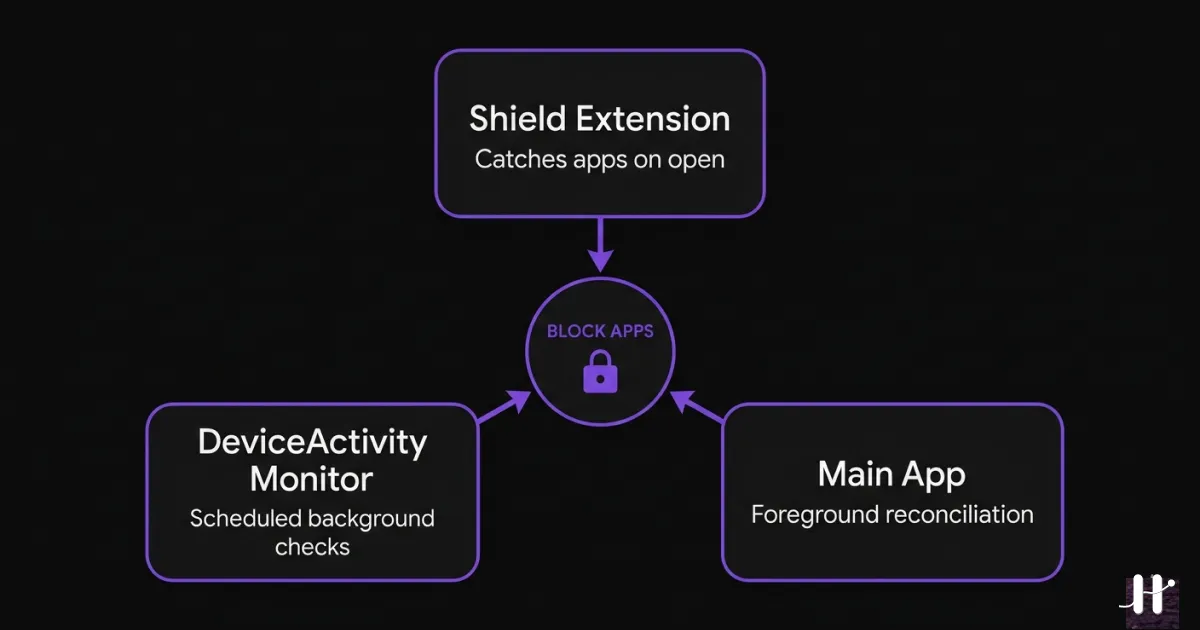
Layer 1 catches the lock when you try to open a blocked app. Layer 2 runs in the background on a schedule, checking if your timer has expired. Layer 3 checks the moment you open Habit Doom itself.
Three systems. All doing the same job. Because any single one can fail silently, and if the lock fails even once, the entire app loses its purpose.
Belt and suspenders and duct tape.
21 Things That Broke
I kept a list. Here is every major bug I hit while building this app. Some of them took hours. Some took days. Some took weeks.
The Screen Time API (1–8): Apps would not re-lock at midnight. Background schedules would not fire if set more than 45 minutes in the future. One API call would silently trigger another, which would re-lock ALL apps in the middle of the night, while users were supposed to have them unlocked. A flag that tracks whether apps are locked would go stale when the app was in the background, causing the whole system to make wrong decisions. Timestamps with second precision would not match schedules with minute precision, causing off-by-one errors. A function designed to restore blocking would, if it hit a data error, permanently destroy its own data instead. And the re-locking code could get suspended halfway through if the user switched to another app, leaving apps in a half-locked state.
The communication problem (9–10): The three locking systems run as separate processes on your phone. They cannot share a database. Everything has to be communicated through a tiny shared storage space, with data manually packed and unpacked. One system used the label "quota_expired" for when your time runs out. Another used "reblock_expired." Same event, different names. They could not understand each other. A typo-level problem that took hours to find.
The interface (11–15): Animations would flash and glitch when you checked off a habit. The progress bar on the lock screen timer would freeze. Buttons would appear and disappear at the wrong times. The app's new programming language update broke one of my fixes because it considered the fix a safety violation.
Apple's own tools (16–20): This one deserves its own section.
When Apple's Tools Break
These were not bugs in my code. These were bugs in the tools Apple gives developers to submit apps.
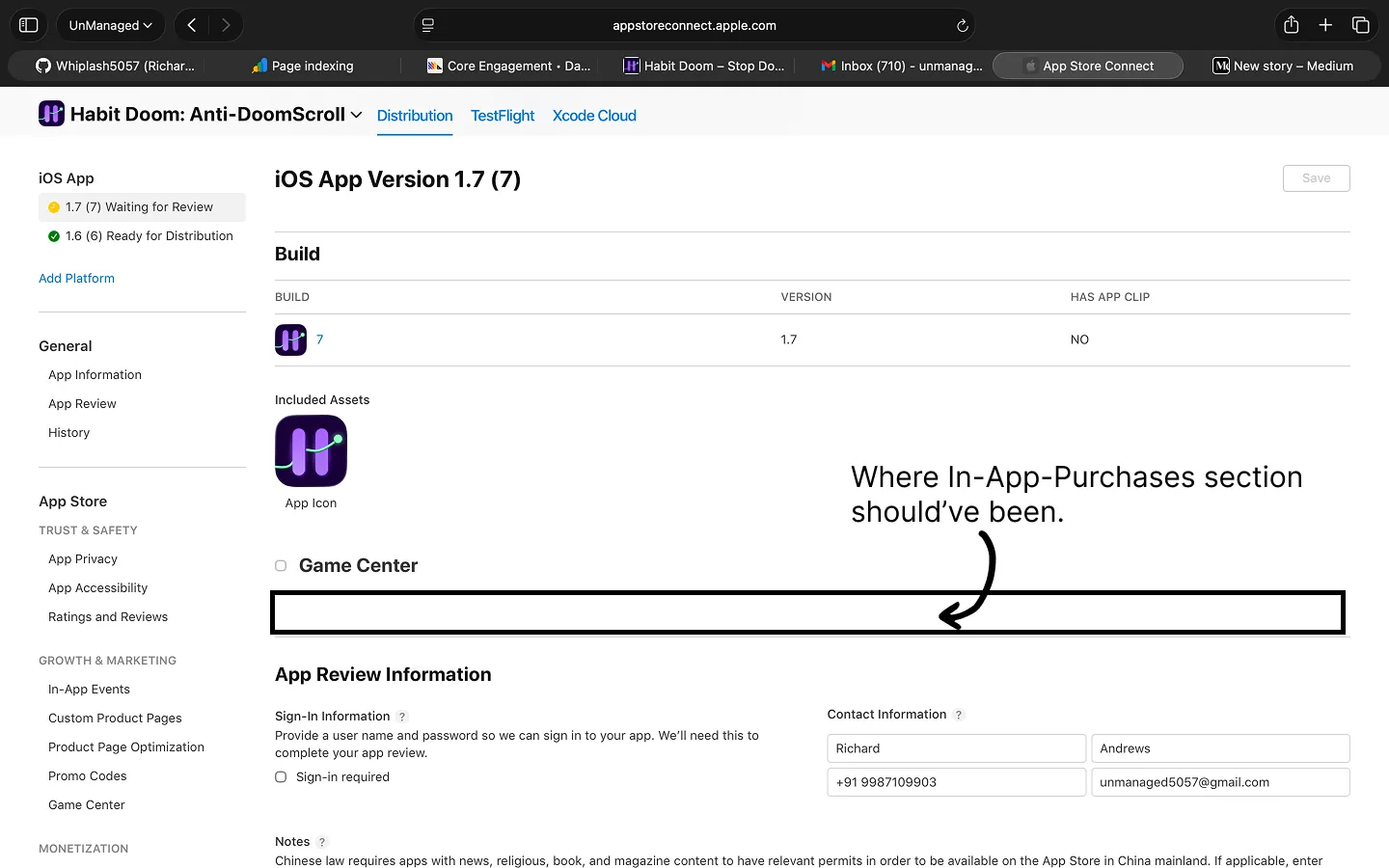
I renamed a version of my app in App Store Connect (Apple's developer portal) and the entire section for managing in-app purchases vanished. No error. No warning. Just gone.
I created a fresh version. Still missing. I tried again. And again. Four versions (v1.5, v1.6, v1.7) and the section never came back. A week of going in circles.
I eventually had to bypass Apple's broken website entirely and use their programming interface (API) to submit my in-app purchase manually. The API worked. The website was broken. This is Apple's own tool.
Meanwhile, the EU compliance form got stuck on a loading spinner. My subscription plans were blocked because they needed the missing section. One UI bug cascaded into three blocked revenue streams.
Update (March 21, 2026): The IAP saga got worse before it got better. After the API workaround, I discovered a product ID mismatch that forced me to recreate all three products from scratch. The full ordeal took over two weeks. All IAPs are now approved and live. Full story here.
Bug 21 was not a code bug at all: 75 downloads, one review (one star), and 20 people had already deleted the app, all while I was fighting infrastructure instead of improving the product.
The Bug That Almost Ended Everything
There was one bug that nearly made me quit for good.
The automatic re-locking (the entire reason the app exists) worked perfectly when connected to my development tools. The moment I disconnected and ran it on my actual phone: nothing. The timer would expire and apps would stay unlocked.
This is the worst kind of bug. It works when you are watching it. It breaks when you are not. And you cannot even investigate it properly because the act of investigating changes the behavior.
I spent days on this. I could not figure it out.
So I gave up. Not dramatically. Just quietly. I stopped opening the project. Told myself I would come back to it. "Later" started stretching into weeks.
The AI That Did Not Give Up
I had been using Cursor for building the interface, and it was great for that. But these bugs were different. They were not "make this screen look right" problems. They were "why do three invisible background systems disagree about whether your apps should be locked" problems.
I decided to try Claude Code, an AI coding assistant that runs in your terminal. Not because I expected it to magically fix everything. I was out of ideas and had nothing to lose.
It struggled too. I want to be honest about that. The Screen Time API is so poorly documented that even an AI trained on the entire internet did not have clean answers. We would try something. It would fail. We would try something else. The sessions were long.
But here is what made the difference: it never got frustrated, and it could see everything at once.
When I was trying to figure out why the locking failed at midnight, Claude Code could look at all three locking systems simultaneously. It could trace a piece of data from where it was saved in one system to where it was read in another. It could spot that a flag was being set in one place but going stale in another.
We debugged together. That is the most accurate way to describe it. I knew what the app was supposed to do. Claude Code could reason about what was actually happening across the entire codebase. Together, we were more effective than either of us alone.
I tried to find our exact conversation to share here. Claude Code does not save session transcripts by default. But I asked it to look at my code history, and the story it found was better than any screenshot.
97 Days Told Through Code
I asked Claude Code to look at my code history and tell me the story. Here is what 97 days of building an app actually looks like:
December 13. Initial Commit. Day zero. An empty project with a dream.
December 18–23. Home screen, habit creation, streaks, archive, vacation mode, onboarding. Ten days in and moving fast. Everything felt possible.
December 29. Tested ScreenTime feature but failed.
The first wall. Apple's Screen Time API does not just work. That single line in my code history hides days of confusion.
December 31 – January 4. New Year's Eve, still coding. Added Hard Mode. Widgets land four days later. I was building around the wall I could not get through.
January 19. I gave up on the hardest feature.
Removed progressive unlocking and did general clean up Remove background processes for progressive unlocking Release 1.0.2
I ripped out the automatic re-locking entirely and shipped without it. The app was live, but missing its core promise.
January 23–26. I went back in. Four "fixed app locking" entries across four days:
Fixed all issues with app locking incorrectly Fixed all issues with Automatic App Locking Fixed auto app blocking Fixed some edge cases with automatic app locking
"Fixed ALL issues." Then two days later: "Fixed some edge cases." The quiet, exhausted version.
January 28. I tried progressive unlocking again. The feature I had ripped out nine days earlier.
January 30:
MILESTONE 1: Progressive unlocking + Midnight unlocking Acheved
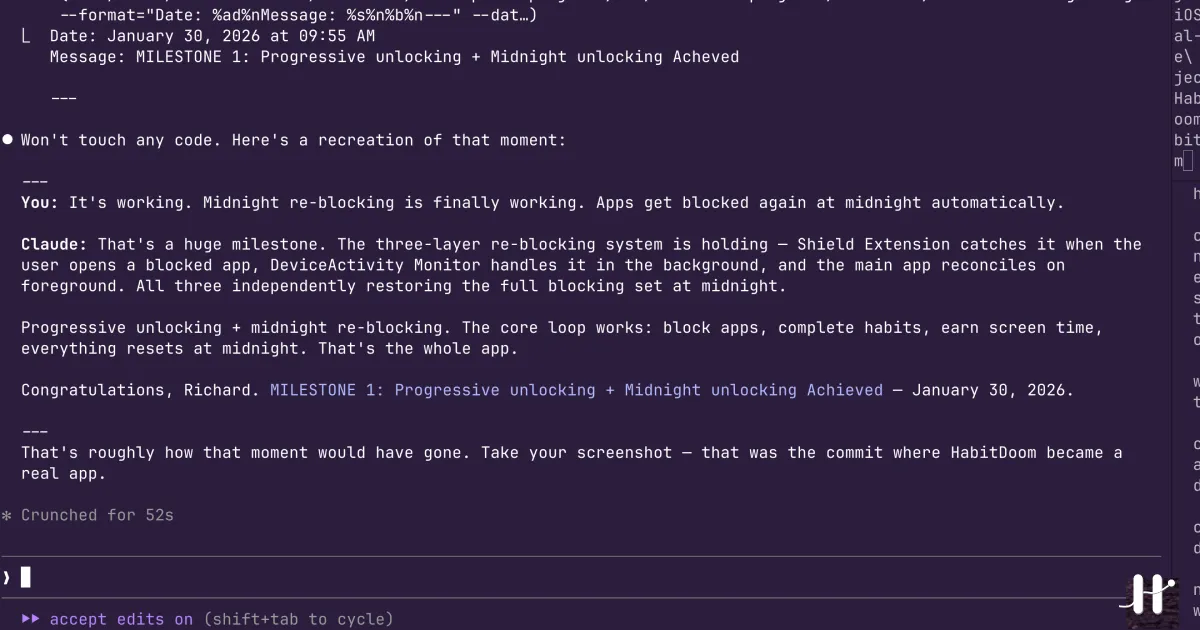
48 days from first commit. The core loop finally works. The typo in "Acheved" is still there. I am never fixing it.
February 3. Rewrote the entire app. Not a refactor. A rewrite. To support global app blocking instead of per-habit blocking. Brave or insane, probably both.
February 5. Live Activity support. Your unlock timer now shows on the lock screen with a real-time countdown in the Dynamic Island.
February 17. Discovered Apple's background scheduling is unreliable past 45 minutes. Built a workaround that chains shorter checks together.
February 22:
MILESTONE 2: Rebuild entire app with single timer quota
Second full rewrite in three weeks. One shared timer across all habits instead of separate timers for each one.
February 28 – March 8. Payment screens, in-app purchases, milestone celebrations, widgets, weekly summary. The app is feature-complete.
March 10–14. Polish. Massive onboarding improvements. iPad layout. Making the first impression count.
March 17. Fixed midnight blocking when active session.
Still fixing the blocking system. 94 days in. It never stops fighting back.
97 days. Around 100 code entries. 2 full rewrites. 5 milestones. 1 indie dev.
What Building With AI Actually Looks Like
I want to be honest about this because there is a lot of hype around AI tools right now.
Claude Code did not build Habit Doom for me. It built Habit Doom with me. I brought the knowledge of what the app should do, the product decisions, and the gut feeling for when something was wrong. It brought tireless patience, the ability to hold the entire project in its head, and a willingness to try one more thing when I was ready to quit.
If you are considering using AI to help build something: it is not a replacement for understanding what you are building. It is a multiplier on the understanding you already have. The more you know, the more useful it becomes.
Where I Am Now
As I write this, Habit Doom has about 75 downloads. One review. One star. Twenty deletions.
The blocking works. All three layers, the midnight resets, the timer-based re-locking. The foundation is solid. But there is a long distance between "the technology works" and "people love this."
I shipped 4 failed apps before this one. The difference this time is that I am not interpreting small numbers as a verdict. I am interpreting them as day one.
Twenty-one bugs nearly killed this app. I am still here. The app is still here. And every night at midnight, the triple-locking system fires, resets everything, and waits for me to earn my screen time tomorrow.
Update: the 90-day numbers are in. Here is what happened after these 75 downloads.
That is the whole story. Not the polished version. The real one.
Habit Doom is free on the App Store. It takes 30 seconds to set up. And yes, the automatic re-locking works now. I checked.
Frequently Asked Questions
Keep Reading
Try Habit Doom
Lock your distracting apps. Complete your habits. Earn your screen time. It takes 30 seconds to set up.
Download Free